














 AI/ML
AI/ML  Software Development








AR Glasses in IT Infrastructure Maintenance and Logistics: How Hands-Free Support Works in Practice
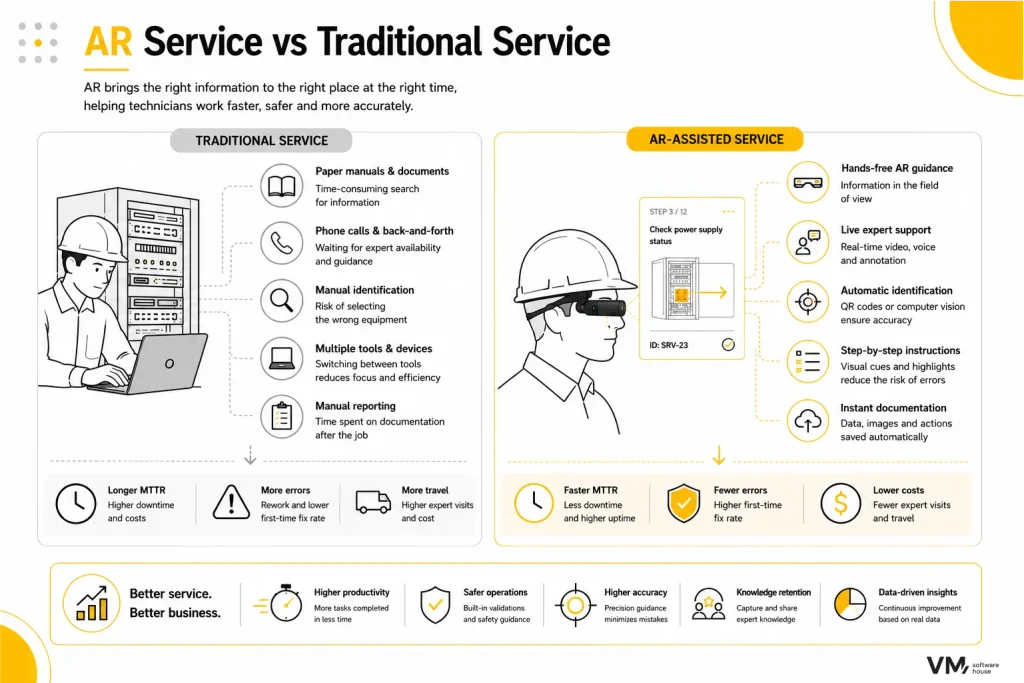
AR glasses used in IT infrastructure maintenance reduce intervention time and lower the risk of errors. The technology integrates documentation and service instructions into a single interface visible directly in the technician’s field of view.
In practice, the technician receives the task directly in the glasses. The system guides them to the correct device, helps identify it, and then displays step-by-step instructions.
Once the work is completed, the system records the performed actions in the service management system. Documentation is generated automatically during the intervention.
Table of Contents
Why AR Works Well in Data Centers and Infrastructure Maintenance
IT infrastructure maintenance takes place in highly complex environments. In a single location, there may be hundreds of devices that look very similar. In such conditions, mistakes are easy to make.
A service intervention often begins with finding the correct device. Only then can the technician move on to diagnosis and repair. At the same time, time pressure is high. An IT system failure may lead to service downtime or the loss of availability of critical business systems.
Another challenge is the availability of experts. In many organizations, specialists are responsible for several locations at the same time. They are not always able to be physically present on site.
This is why AR glasses are beginning to play an important role in infrastructure maintenance. The technology brings instructions, device data, and communication with experts directly into the technician’s workspace.
The technician no longer needs to switch between a laptop, documentation, and the equipment. All the necessary information appears exactly where it is needed. AR does not replace the technician’s expertise. Instead, the technology primarily eliminates wasted time and reduces the risk of errors caused by unclear instructions.
What IT Infrastructure Maintenance Looks Like with AR Glasses
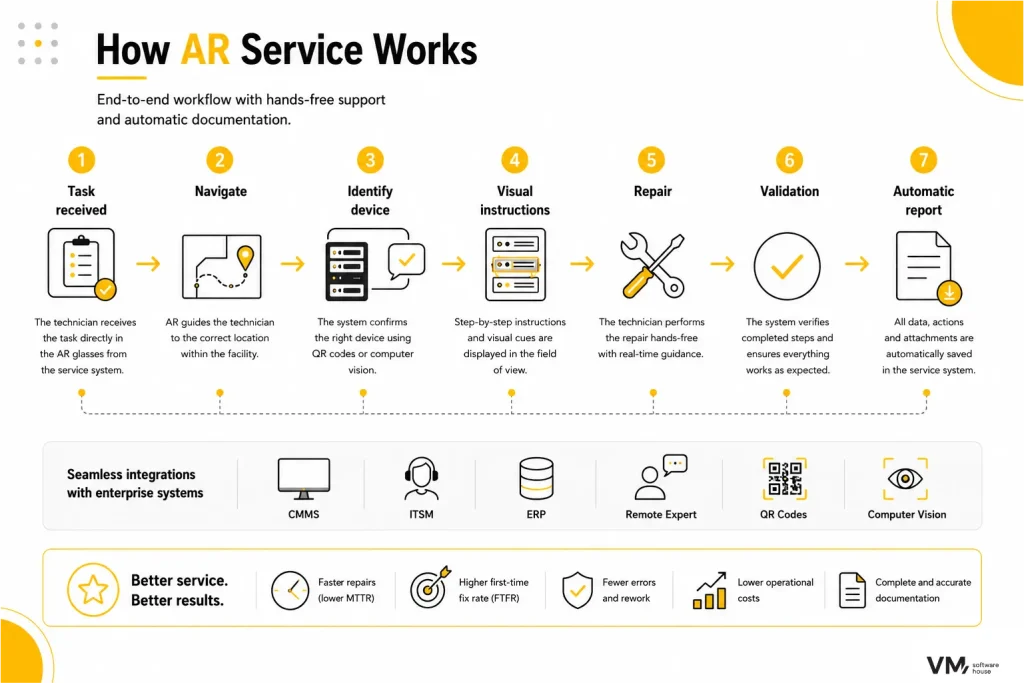
In a mature deployment, AR glasses support the technician at every stage of the intervention. The process begins with task assignment and ends with an automatic report saved in the service management system.
Task initiation
The technician puts on the AR glasses and immediately sees information about the task. The data comes from the ticketing system, such as CMMS or ITSM.
In the technician’s field of view appears the problem description, device identifier, and location. Often, the history of previous interventions and safety recommendations are also available.
Thanks to this, the technician can begin work without searching through documentation or switching between multiple tools.
Navigation to the device
After accepting the task, the system guides the technician to the correct location.
AR glasses display the direction and a mini map of the building. The technician can see where to go and which rack cabinet contains the device.
In large infrastructure facilities, this feature significantly reduces the time required to reach the device, which directly impacts repair time.
Device identification
Once the technician reaches the work location, the system helps confirm that they are at the correct device.
Identification can be performed in several ways. The most common methods include QR codes or computer vision. In the technician’s field of view, the device name, identifier, and component diagram appear.
This is a critical stage of the process. In many data centers, devices look almost identical. Clear identification minimizes the risk of mistakes.
AR visual guidance
Another key element of the system is the layer of visual guidance.
On the image of the device, markers, arrows, and highlights appear over specific components. The technician can clearly see which element needs to be inspected or replaced.
This solution reduces the risk of mistakes, especially in environments where many components look similar.
Performing the repair
During the repair, the technician works in hands-free mode.
Information is displayed directly in the field of view. There is no need to use a laptop or phone. The system guides the technician through the next steps of the procedure.
As a result, the workflow becomes smoother and interruptions during the task are significantly reduced.
Work validation
After completing the repair, the system asks for confirmation of key steps. The technician checks whether the component works correctly and whether the device has been properly restarted.
Confirmation can be performed via voice command or a simple gesture.
This step increases the quality of the service process. Each stage is formally confirmed.
Intervention documentation
The final stage is saving the results of the work in the service management system.
The system automatically records the actions performed, intervention time, and visual materials. Documentation is created during the technician’s work, making it more accurate and complete.
The data can later be used to analyze service processes and optimize the work of infrastructure maintenance teams.
AR in Logistics and Warehousing
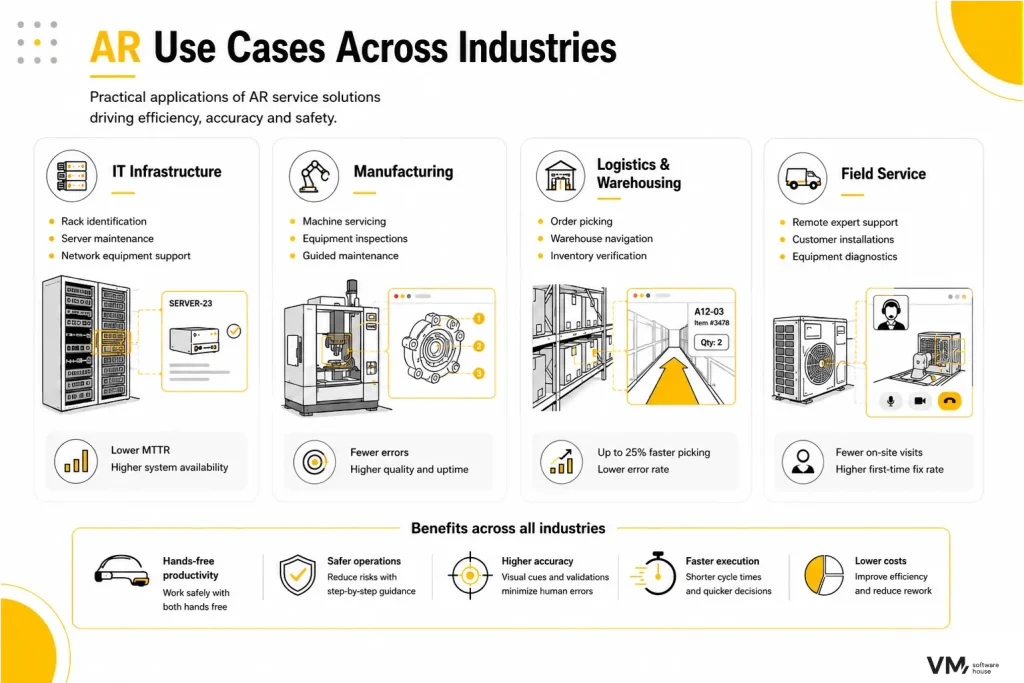
AR technology is also used in logistics. One of the most common examples is order picking in warehouses.
An employee starts the process, and the system guides them to the correct shelf and specific container. The glasses display the exact location from which the product should be picked.
After scanning the code, the system confirms the correct item and indicates the next step.
Such a solution shortens picking time and reduces the number of errors. In pilot implementations at DHL, the use of smart glasses increased picking efficiency by up to about 25 percent.
AR Solution Architecture
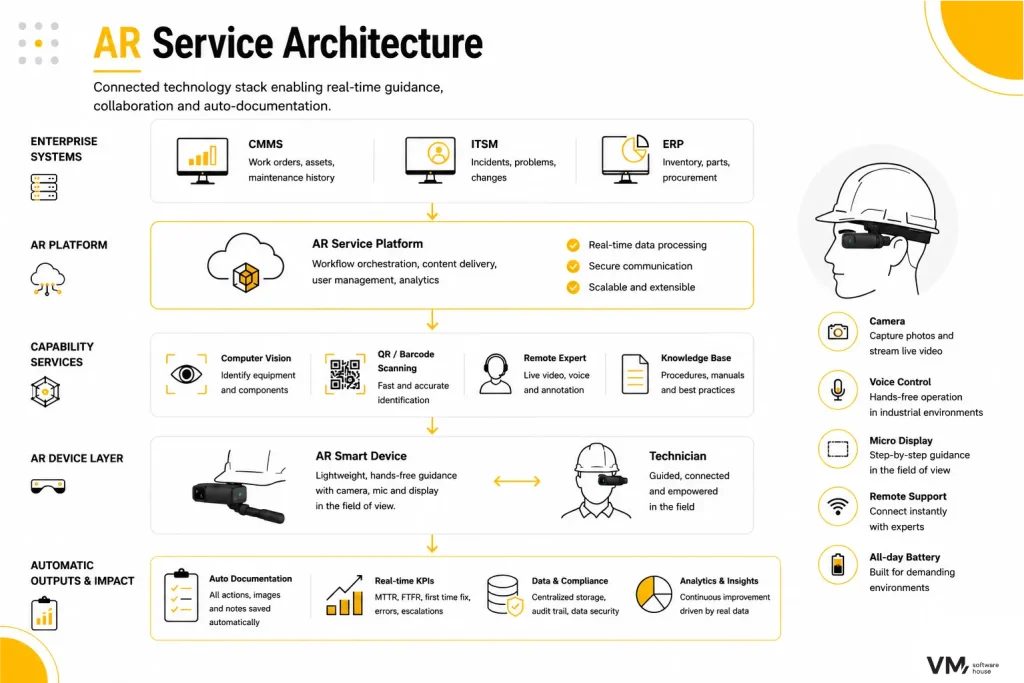
An AR system for infrastructure maintenance consists of several technological layers.
The first layer is the hardware. This includes glasses equipped with a camera, microphone, and a display placed in the user’s field of view.
The second layer is the AR application. It is responsible for displaying tasks, instructions, and visual guidance.
Another element is the remote support platform. It enables technicians to connect with experts and stream video in real time.
In more advanced deployments, there is also a device recognition layer. It uses computer vision or QR codes.
However, the greatest value comes from integrations with enterprise systems such as CMMS, ERP, and ITSM platforms. Thanks to these integrations, AR becomes part of the full operational process.
How to Measure the Impact of an AR Deployment
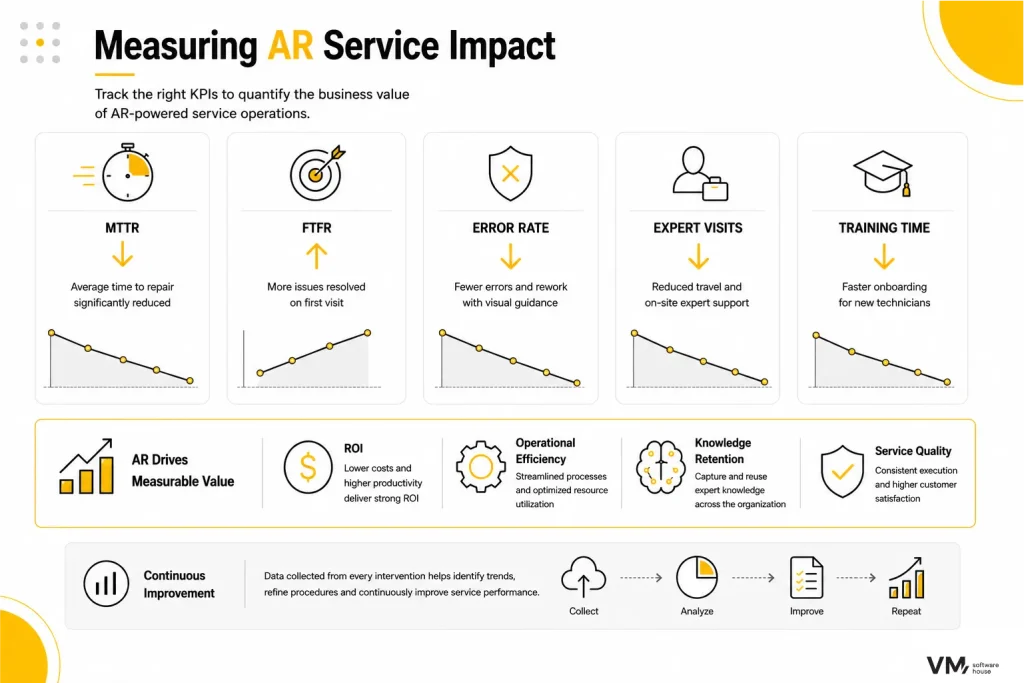
Organizations implementing AR glasses in infrastructure maintenance typically analyze several key metrics.
One of the most important is MTTR (Mean Time to Repair), which measures the average time required to fix an issue. Another important indicator is FTFR (First-Time Fix Rate), which shows how many cases were resolved during the first intervention.
Other relevant metrics include the number of escalations to experts and the number of errors requiring a follow-up intervention. In many cases, organizations also track the number of expert on-site visits and the time required to train new technicians.
These metrics are the ones that most often reveal the real value of implementing AR technology.
Categories:




Design, Development, DevOps or Cloud – which team do you need to speed up work on your projects? Chat with your consultation partners to see if we are a good match.
Jakub Orczyk
Member of the Management Board/ Sales Director VM.PL
Book a free consultation