













 AI/ML
AI/ML  Software Development








Creating a Website with AI – Building a Product Page for OPC Gateway
Table of Contents
A website as a real sales tool
Today, a website is much more than just a company’s digital business card. It is a point of contact with potential customers, a place where competencies are first evaluated, and a space where trust in a product begins to develop. In our case, communication for a long time was based mainly on service pages. However, as the company grew and we began developing universal products that could be implemented for clients, the need for something more emerged — a dedicated product page.
A product page follows different rules than a service page. It must include specific information: the features of the solution, its use cases, how it works, the business benefits it provides, and clear calls to action. In the case of OPC Gateway, the product itself was free. The paid option was implementation and mentoring, which remain completely optional. The page therefore had to clearly communicate the value of the solution, enable users to download it, and guide them toward contacting us.
Naturally, a question arose: are we able to create such a page quickly and at a low cost, without engaging in a full development process?
Experiment: Is AI Enough to Build a Product Website?
Creating a professional website usually requires time, the work of several specialists, and a dedicated budget. However, we decided to approach this project as an experiment and test whether an AI-based tool could help us achieve a satisfactory result with minimal financial investment.
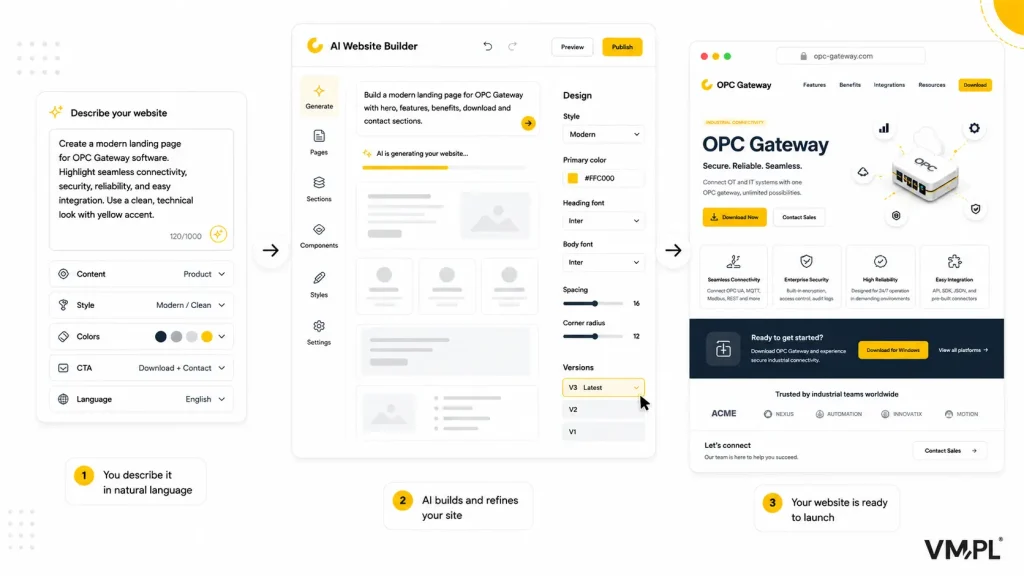
The most important step was finding the right tool. In our case, we chose Lovable — a solution that allows websites to be generated based on descriptions written in natural language. After selecting the tool, we began analyzing the styles of websites that could serve as a reference point for us. The goal was not to copy specific solutions one-to-one, but rather to define a visual and communication direction that would help guide the model through our concept.
The website content was prepared by a copywriter who consulted with the team responsible for product development. Only after refining the messaging were we ready to start generating the website.
A deliberate limitation: using only the free version
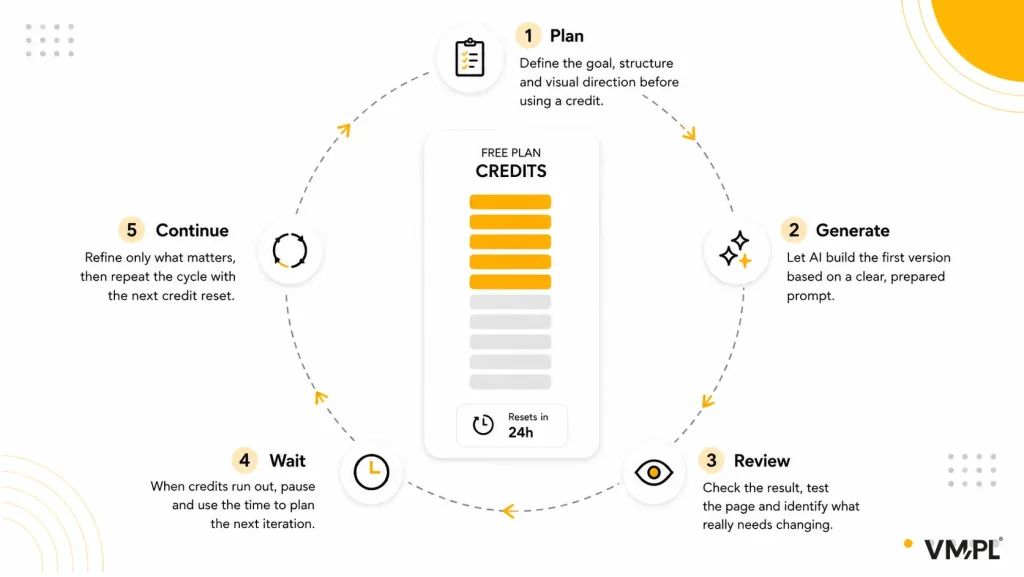
To push the tool’s capabilities even further, we decided to rely exclusively on the free version. This meant a limited number of credits that refreshed every 24 hours and the need to carefully plan each step. Every action had to be intentional.
Our goal was to create the website in three languages: Polish, English, and German. Within the first two days, we managed to generate a solid project foundation. After describing the concept, defining the style and brand colors, and inserting the prepared text, the tool generated a complete website structure. Sections, animations, buttons, links, icons, and basic visual elements appeared automatically.
If an element was not satisfactory, it was possible to precisely describe the change that the model should introduce. However, it sometimes happened that modifying one part of the page unintentionally changed another section. This required additional iterations. Despite this, the entire process remained relatively smooth.
Refining the design, improving functionality, creating product download buttons, adding contact links, duplicating the site, and translating it into two additional languages took about a week in total. Due to the daily action limits, every step had to be carefully planned.
Importantly, the person responsible for the project never had to manually edit the code. From a developer’s perspective, the code generated by AI was not perfect, but it was functional and fully operational. The website was published, is accessible in a browser, searchable, and genuinely fulfills its purpose.
What worked well, and where are the limits of AI
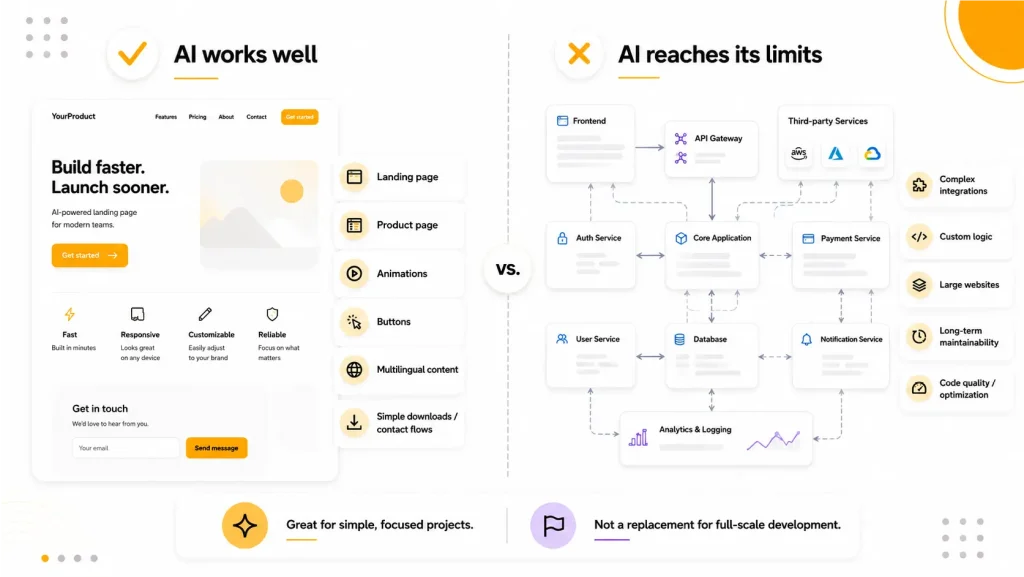
The biggest advantage of using AI to create a website was speed and a low barrier to entry. Within a week and a half, we created a three-language product website with animations, buttons, informational sections, and the ability to download the product.
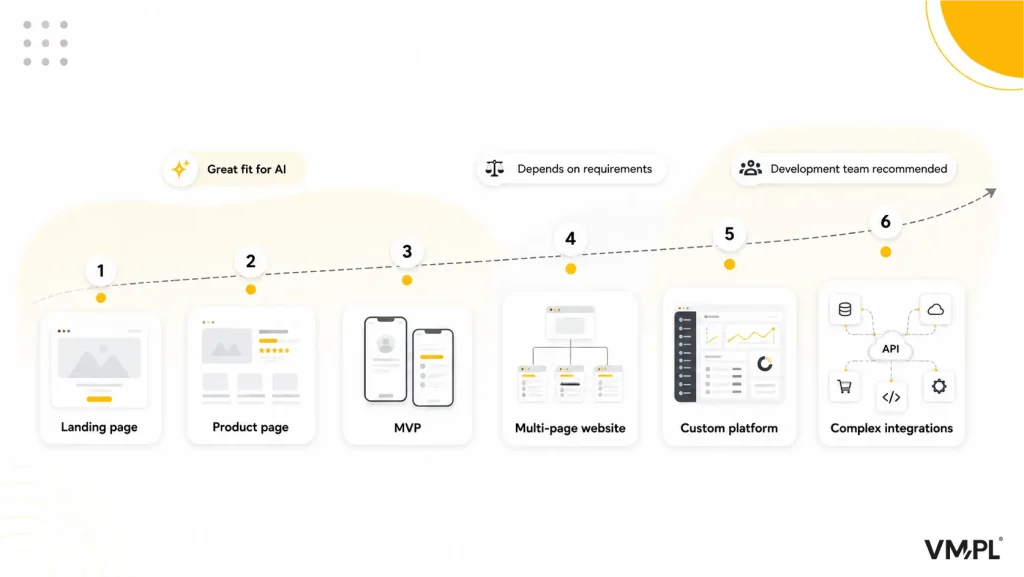
At the same time, it is important to be clear: this type of solution works best for simple product websites. If the goal is a complex platform with many subpages, custom features, advanced logic, or complicated integrations, the traditional approach involving a development team provides much greater control over code quality, optimization, and future modifications.
In this context, AI does not replace a software house. However, it is a very effective, fast, and often free alternative for simple and well-structured projects.
Is it worth creating a website with AI?
From our perspective, the answer is yes — provided that the project scope is realistic. For a simple product website whose goal is to present features, use cases, and enable contact or product downloads, an AI tool can significantly shorten development time and reduce costs.
For more advanced projects, it is worth considering the traditional approach to maintain full control over the structure and quality of the code. However, as a fast solution for product validation, building a landing page, or creating a simple product website, generative AI works very well.
See the results of our experiment
Instead of relying only on our description, we encourage you to test the results yourself. Visit the OPC Gateway product page and decide whether a website created with the help of AI fulfills its purpose.
Categories:



Design, Development, DevOps or Cloud – which team do you need to speed up work on your projects? Chat with your consultation partners to see if we are a good match.
Jakub Orczyk
Member of the Management Board/ Sales Director VM.PL
Book a free consultation